.NET CLI
dotnet add package Spanfold --version 0.1.0-preview.2
dotnet add package Spanfold.Testing --version 0.1.0-preview.2
Record when keyed state was active, then compare those windows across sources, providers, or pipeline stages. Use it when the latest value is not enough.
dotnet add package Spanfold --version 0.1.0-preview.2
dotnet add package Spanfold.Testing --version 0.1.0-preview.2Install-Package Spanfold -Version 0.1.0-preview.2
Install-Package Spanfold.Testing -Version 0.1.0-preview.2<PackageReference Include="Spanfold" Version="0.1.0-preview.2" />
<PackageReference Include="Spanfold.Testing" Version="0.1.0-preview.2" />NuGet.org publishes these two packages at 0.1.0-preview.2, and the runnable C# example below uses that release's Spanfold.Spanfold.For<TEvent>() entry point. The repository's 0.2.0-preview.1 release set adds Spanfold.Artifacts as a supported package; Spanfold.Cli remains checkout-only.
cd packages/rust
cargo test --workspacecargo add spanfold@0.1.1cargo install spanfold-cli --version 0.1.1Rust supports the core API, selector-backed comparisons, Episode analytics, exports, audit bundles, and CLI workflows.
Model
A temporal window is the period where a predicate stayed true for a key. Keep the lane, segment, and tag context with that range, then compare it without hand-written interval joins.
A latest-value table would only show online at the end. The window keeps the four-position offline span as the thing you can query, measure, and compare.
One comparison plan emits three row kinds at once. Residual is target-only, overlap is agreement, missing is against-only. Coverage, gap, containment, lead/lag, and as-of extend the same rows.
The horizon is the moment the live run asks its question. Rows derived from windows still open at that moment are provisional: they can change, and exports say so.
Problem
A current-state table can answer what is true now. It cannot answer when a state became true, which source saw it first, whether another source missed it, or what information was knowable at the decision point.
Keep the temporal record as data in application code. Persist it, compare it, export it, or render it as a debug artifact.
Use cases
Find where one provider reported an outage that another missed, reported late, or recovered from sooner.
Evaluate only the windows and annotations that were knowable at a specific processing position or timestamp.
Include still-open windows at a live horizon while keeping provisional rows separate from final rows.
Compare stages in a pipeline to see where state diverged, lagged, disappeared, or gained extra coverage.
Track periods where readings stayed above, below, or inside a range: 23.4 C, 23.5 C, 23.8 C.
Primitives
Open the Episode analysis guide · Open the ordered sequences guide
Visual Auditing
Export a self-contained HTML artifact when a row needs inspection: selected windows, aligned segments, gaps, and provisional live rows.
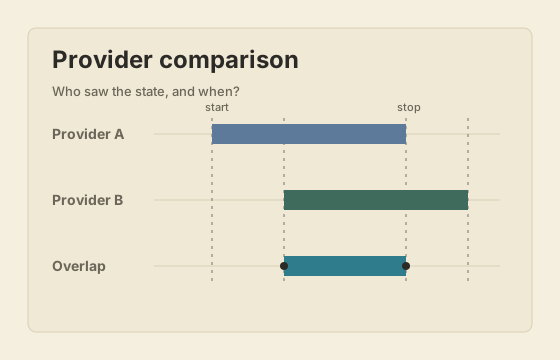 Provider comparison
Six lanes with overlap, residual, missing, coverage, and live finality.
Provider comparison
Six lanes with overlap, residual, missing, coverage, and live finality.
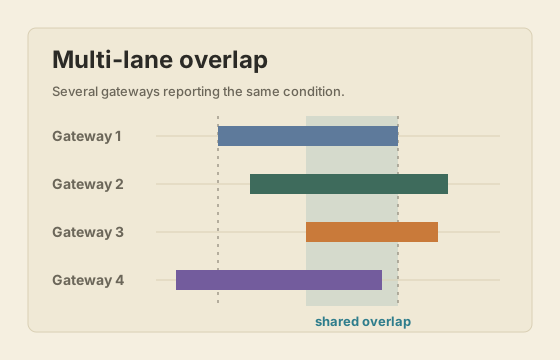 Multi-lane overlap
Several gateways reporting staggered active windows.
Multi-lane overlap
Several gateways reporting staggered active windows.
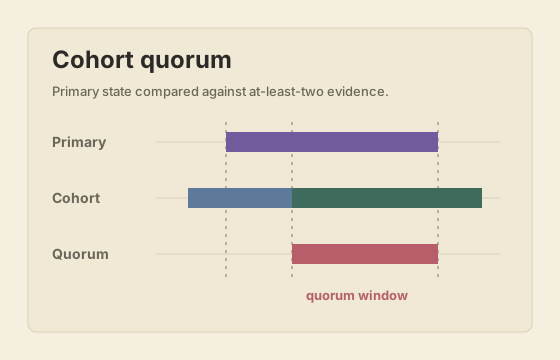 Cohort quorum
A primary lane compared against an at-least-two cohort.
Cohort quorum
A primary lane compared against an at-least-two cohort.
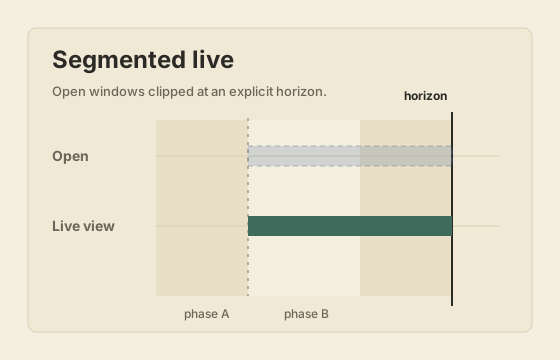 Segmented live windows
Phase and period segments with open windows clipped at a horizon.
Segmented live windows
Phase and period segments with open windows clipped at a horizon.
Code examples
dotnet add package Spanfold --version 0.1.0-preview.2
dotnet add package Spanfold.Testing --version 0.1.0-preview.2
`Spanfold.Testing` is optional. It provides fixtures, snapshots, and assertions for consumer tests.
cargo add spanfold@0.1.1
cargo install spanfold-cli --version 0.1.1
The Rust package supports the core comparison API, selector-backed plans, Episode analytics, deterministic exports, audit bundles, and CLI workflows.
using Spanfold;

var pipeline = Spanfold.Spanfold
    .For<DeviceSignal>()
    .RecordWindows()
    .TrackWindow(
        "DeviceOffline",
        key: signal => signal.DeviceId,
        isActive: signal => !signal.IsOnline);

pipeline.Ingest(new DeviceSignal("device-17", false), source: "provider-a");
pipeline.Ingest(new DeviceSignal("device-17", true), source: "provider-a");

public sealed record DeviceSignal(string DeviceId, bool IsOnline);
use spanfold::for_events;
#[derive(Clone)]
struct DeviceSignal {
device_id: String,
is_online: bool,
}
let mut pipeline = for_events::<DeviceSignal>()
.record_windows()
.track_window(
"DeviceOffline",
|signal| signal.device_id.clone(),
|signal| !signal.is_online,
)
.build();
pipeline.ingest(
DeviceSignal { device_id: "device-17".into(), is_online: false },
Some("provider-a"),
None,
);
pipeline.ingest(
DeviceSignal { device_id: "device-17".into(), is_online: true },
Some("provider-a"),
None,
);var result = pipeline.History
.Compare("Provider QA")
.Target("provider-a", selector => selector.Source("provider-a"))
.Against("provider-b", selector => selector.Source("provider-b"))
.Within(scope => scope.Window("DeviceOffline"))
.Using(comparators => comparators
.Overlap()
.Residual()
.Missing()
.Coverage())
.Run();
result.ExportDebugHtml("artifacts/provider-qa.html");
result.ExportLlmContext("artifacts/provider-qa.llm.json");use spanfold::{export_result_llm_context, ComparisonDebugHtmlOptions, ComparisonLlmContextOptions};
let result = pipeline
.history()
.compare("Provider QA")
.target_source("provider-a")
.against_source("provider-b")
.scope_window("DeviceOffline")
.overlap()
.residual()
.missing()
.coverage()
.run_with_exports(
&ComparisonDebugHtmlOptions::to_file("artifacts/provider-qa.html"),
&ComparisonLlmContextOptions::to_file("artifacts/provider-qa.llm.json"),
)?;
let llm_json = export_result_llm_context(&result)?;Boundaries
A database can persist windows, but it will not give you staged comparison plans, selectors, normalization, live finality, diagnostics, or deterministic exports by itself.
Latest-state tables answer what is true now. Window history answers when it was true, who saw it, and whether another lane missed it.
Stream processors route and aggregate events. This layer stays smaller: it records interpreted state windows and compares their temporal evidence.
Dashboards compress time into counters, rates, and charts. Window comparison keeps individual ranges and emits rows that can be audited.
Event sourcing preserves facts and rebuilds state. Window comparison analyzes the ranges produced after those facts have been interpreted.